Inside React's work loop: what the reconciler calls after setState
After you call setState, React does not re-render on the spot. It records the update, renders at some later point, and only then writes the result into the DOM. From setState to pixels collapses what React does into two steps, render and commit. So inside those two steps, which functions does React call, in what order? And which renders can stop halfway to let the browser handle something else?
These functions all live in react-reconciler. The reconciler is the part of React that works out how the screen should change. The walk below follows the numbers on this diagram from 7km.top:
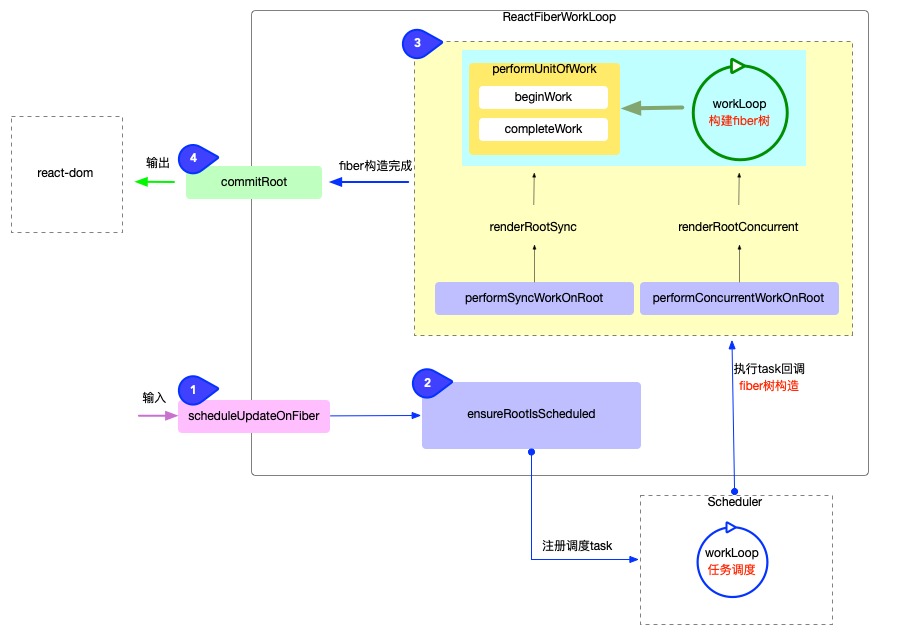 The reconciler's flow in four steps. Credit: 7km.top reconciler workflow.
The 7km.top series is written against the React 17.0.2 source. Most functions in the diagram still exist in React 19.3.1; two were renamed, covered in step 3.
What fiber, lane, and Scheduler are
- fiber: React creates one record object for every component and every DOM node, called a fiber. It holds props, state, children, and the matching DOM node. Fibers link into a tree through three pointers:
child,sibling,return. Once a component has updated, its fiber has two copies, one matching what is on screen now and one this render is building, and the two point at each other through thealternatefield. Where fibers come from and why there are two copies is in ReactNode, ReactElement, Component, div. - lane: the priority of an update. React uses different bits of one integer for different priorities, such as
SyncLaneandDefaultLane; transitions use a few other bits. - Scheduler: the
schedulernpm package, which decides when a piece of work runs. It is not part of React itself.
1. Input: scheduleUpdateOnFiber
When an event handler calls setState, React does three things in order, in dispatchSetState in ReactFiberHooks.js:
requestUpdateLanepicks this update's lane. Called inside a discrete event such as a click, it isSyncLane; insidestartTransition, a transition lane; insidesetTimeoutor after a fetch resolves,DefaultLane.- It puts the update into the hook's queue, and records on this component's fiber that an update with this lane is pending.
- It calls
scheduleUpdateOnFiber(root, fiber, lane), which records the lane's work on the root as well, then calls the next step,ensureRootIsScheduled.
A function component's setState, a useReducer dispatch, a class component's this.setState, and root.render() all end up calling scheduleUpdateOnFiber. At this point React has not rendered anything.
2. Register: ensureRootIsScheduled
In React 19.3.1, ensureRootIsScheduled in ReactFiberRootScheduler.js does only two things: it adds the root to a list of roots with pending work, and it makes sure a microtask is scheduled. Ten setState calls in one event handler still schedule just one microtask.
When the microtask runs, React decides what to do in scheduleTaskForRootDuringMicrotask:
- If it is
SyncLane, React does not hand it to Scheduler; it renders and commits right at the end of the same microtask. - If it is any other lane, React calls Scheduler's
scheduleCallbackto queue a task, and Scheduler decides when it runs.
React 18.3.1 works differently: ensureRootIsScheduled decides the priority right inside setState and calls scheduleCallback on the spot. The 7km.top diagram shows this approach.
Scheduler also has its own work loop, the "workLoop 任务调度" box in the bottom right of the diagram. That loop only runs queued tasks in order; it does not build fibers.
3. Build the fiber tree
When Scheduler runs the task React queued, or the SyncLane microtask reaches its end, React starts rendering. This is the blue arrow in the diagram labeled "执行 task 回调 / fiber 树构造" (run the task callback / build the fiber tree).
The two entry points in the diagram, performSyncWorkOnRoot and performConcurrentWorkOnRoot, are React 17 names. In React 19.3.1, the microtask goes through performSyncWorkOnRoot and a Scheduler task goes through performWorkOnRootViaSchedulerTask. Both call performWorkOnRoot in ReactFiberWorkLoop.js, which decides whether this render can stop halfway:
const shouldTimeSlice =
  (!forceSync &&
    !includesBlockingLane(lanes) &&
    !includesExpiredLane(root, lanes)) ||
  checkIfRootIsPrerendering(root, lanes);

let exitStatus: RootExitStatus = shouldTimeSlice
  ? renderRootConcurrent(root, lanes)
  : renderRootSync(root, lanes, true);
includesBlockingLane lists SyncLane, InputContinuousLane, DefaultLane, and a few others. If the lanes being rendered include any of them, the render goes through renderRootSync and finishes in one go.
So being scheduled by Scheduler does not mean a render can stop halfway. A setState inside setTimeout is DefaultLane; even though it becomes a Scheduler task, its render still goes through renderRootSync. Only transition, Suspense retry, and idle lanes get their render split into small pieces. If a transition is still unfinished 5 seconds after it was scheduled, includesExpiredLane becomes true and from then on it also renders in one go.
Measured in Chrome 156: a component has 300 children, and each busy-waits 1 ms while rendering. Alongside, a counter keeps queueing new tasks with MessageChannel, and each child records the counter's value when it renders. If all 300 record the same value, the whole render ran inside one task and the browser had no chance to do anything else in between. Three runs per case:
| Where the update comes from | Distinct counter values |
|---|---|
| click | 1, 1, 1 |
startTransition inside a click | 60, 60, 61 |
setTimeout | 1, 1, 1 |
startTransition inside setTimeout | 60, 60, 60 |
Only the transition renders were split. 300 ms of work in 60 pieces is about 5 ms per piece, matching frameYieldMs = 5 in the Scheduler source.
Either path ends up in the same kind of loop. The two versions in React 19.3.1:
function workLoopSync() {
  while (workInProgress !== null) {
    performUnitOfWork(workInProgress);
  }
}

function workLoopConcurrentByScheduler() {
  while (workInProgress !== null && !shouldYield()) {
    performUnitOfWork(workInProgress);
  }
}
workLoopConcurrentByScheduler calls shouldYield() after every fiber, asking Scheduler whether the 5 ms are used up. If they are, it leaves the loop and gives the main thread back to the browser. workLoopSync does not ask; it keeps going until workInProgress becomes null.
Each fiber is visited twice
Each turn of the loop handles one fiber, in depth-first order. Suppose the component tree is an App with a div under it, and an h1 and a p under the div. React visits them in this order:
beginWork(App)beginWork(div)beginWork(h1);h1has no childcompleteWork(h1), then move to the siblingbeginWork(p);phas no childcompleteWork(p); no more siblings, go back up to the parentcompleteWork(div)completeWork(App)
On the way down, React calls beginWork: for a function component it runs the function, compares the returned elements with last time, creates or updates the child fibers, and moves to the first child.
On the way up, React calls completeWork: for a host component such as div or span, it creates the DOM node in memory, or records which attributes need to change, then merges its children's flags into its own, so commit knows where in the whole tree something needs to change. A parent's DOM node can only have its children attached once their DOM nodes exist, which is why this happens on the way up.
performUnitOfWork itself only calls beginWork. When beginWork returns null, the fiber has no child, so performUnitOfWork calls completeUnitOfWork instead, which runs completeWork and then decides whether to move to the sibling or keep going up.
Why not recursion
This walk is a while loop with no recursive calls. Every fiber has the three pointers child, sibling, return, and the loop follows them one step at a time. The current position is kept in the workInProgress variable, not on the JavaScript call stack. So React can stop between any two fibers, give the main thread back to the browser, and continue in the next task from the fiber workInProgress points to.
The reconciler before React 16 walked the component tree recursively, so the current position lived on the call stack. A call stack cannot be saved and resumed later, so the walk had to run to the end in one go. When the React team described Fiber in React Fiber Architecture, they called it a "reimplementation of the stack", where each fiber is like a stack frame that can be kept in memory and run again at any time.
When the loop ends, the workInProgress tree is built, and every place that needs to change has been marked with a flag.
4. Output: commitRoot
Once the fiber tree is built, React calls commitRoot.
commitRoot runs before mutation, mutation, and layout, in that order, writing the marked changes into the real DOM; useEffect is queued to run later. The green arrow labeled "输出" (output) in the diagram points from commitRoot to react-dom.
These three steps usually finish within one call, and the browser gets no chance to run another task in between. In React 19.3.1, though, when a transition update touches a <ViewTransition> component, commitRoot in ReactFiberWorkLoop.js finishes before mutation and then, through startViewTransition in ReactFiberConfigDOM.js, calls the browser's document.startViewTransition, putting mutation and layout into its update callback; the browser decides when that runs. An app that uses no <ViewTransition> always finishes commit within one call.
The reconciler itself never touches the DOM. Functions it calls, such as appendChild, insertBefore, removeChild, commitUpdate, are implemented by react-dom in ReactFiberConfigDOM.js, and those are what call the DOM APIs. After this step the DOM has changed, and it is the browser's turn to run Style Recalc, Layout, Paint, and Composite.
The four steps at a glance
| Step | Function in React 19.3.1 | What it does | Can it stop halfway? |
|---|---|---|---|
| 1. Input | scheduleUpdateOnFiber | Pick the lane, record the update on the fiber and the root | No render yet; finishes on the spot |
| 2. Register | ensureRootIsScheduled, then scheduleTaskForRootDuringMicrotask in the microtask | SyncLane stays in the microtask; other lanes go to Scheduler | No render yet; finishes on the spot |
| 3. Build the fiber tree | performUnitOfWork (beginWork, completeWork) | Build workInProgress, compare with last time, create DOM nodes | Only for transition, retry, idle lanes |
| 4. Output | commitRoot | Write the changes into the DOM | Usually not; when a transition update touches a <ViewTransition>, other tasks run between before mutation and mutation |
Most components do not run again
Every update walks from the root, and after an interruption it starts again from the root, which sounds expensive. But most fibers bail out, meaning React does not run that component again.
When beginWork reaches a fiber whose props are the same object as last time, with no context change and no pending update of its own, React does not run that component again, and then looks below it:
- Nothing below has a pending update either: the whole subtree is skipped, and no component inside it runs.
- Some descendant has an update: this component does not run, but React keeps walking down until it reaches that descendant.
Each fiber's childLanes records whether anything below it has a pending update, so even though React starts from the root, it only walks into the paths that changed.
Three runs per case. Parent has three children: Plain, not wrapped in memo; Memo, wrapped in React.memo, with Inner under it; and MemoOuter, also wrapped in memo, with Middle under it and Leaf, which has its own state, under that:
| Whose state changed | Components that rendered again |
|---|---|
Parent | Parent, Plain |
Leaf | Leaf |
When Parent updated, neither Memo nor Inner ran. When Leaf updated, Parent, MemoOuter, and Middle did not run; React followed childLanes down to Leaf.
You can make more fibers skip. React.memo lets a child skip when its parent runs again, as long as every prop is the same as last time; useMemo and useCallback keep the objects and functions you pass down the same between renders, so that comparison passes.
When setState receives the same value as the current one (compared with Object.is), React usually drops the update before scheduling anything, but not every time. The React docs for useState also say "in some cases React may still need to call your component before skipping the children". Measured results, three runs each:
| Case | Click 1 | Click 2 | Click 3 | Click 4 |
|---|---|---|---|---|
state is 0, every click calls setN(0) | nothing renders | nothing renders | nothing renders | nothing renders |
state is 0, every click calls setN(1) | App, Child | App | nothing renders | nothing renders |
In the second case, on click 2 the value is already 1, yet App still rendered once, while Child under it was skipped. dispatchSetState compares the old and new values before scheduling, and drops the update if they are equal, only when neither this fiber nor its alternate has a pending lane.
Why click 2 still renders: lanes on the two fibers
When App first mounts, React creates only one fiber; its alternate is null, and the second copy is not created until the first update. So on click 1, setState records SyncLane on that one fiber only. During the render, React copies a second fiber from it and clears the second fiber's lanes to 0 before running App. After commit, the second fiber becomes the one on screen and the first becomes the alternate. This render cleared only the second fiber's lanes; the first still carries SyncLane.
Reading the lanes of App's two fibers before each click, three runs, all identical:
| When read | lanes of the fiber on screen | lanes of the alternate |
|---|---|---|
| Before click 2 | 0 | SyncLane (value 2) |
| Before click 3 | 0 | 0 |
So on click 2, dispatchSetState did not compare the values; it recorded SyncLane on both fibers and scheduled a render. This render uses the alternate, and React clears its lanes to 0 before running App. App computes the same state as last time, so React calls bailoutHooks in ReactFiberHooks.js, which removes SyncLane from the fiber on screen too, and then skips Child. Only at this point are both fibers' lanes 0. On click 3 both are 0, so dispatchSetState compares the values, finds them equal, and drops the update.
Three packages, one job each
The diagram separates three things that often get mixed together:
- Scheduler decides when to run.
- The reconciler (ReactFiberWorkLoop in the diagram) decides how to build the fiber tree and what needs to change.
- react-dom writes those changes into the DOM.
scheduler is a dependency of react-dom and is installed along with it. The reconciler's code, on the other hand, is compiled straight into react-dom: react-dom-client.production.js in react-dom 19.3.1 defines beginWork and performUnitOfWork itself.
react-reconciler is also published as its own npm package for people writing their own renderer. Swap out react-dom, and the same reconciler can draw components into a 3D scene (react-three-fiber) or a terminal (ink).
 How the three core packages, react-dom, react-reconciler and scheduler, call each other (React 17.0.2). Credit: 7km.top macro package structure.
How the APIs you use connect to the four steps
Most of these four steps happen in places you never import. Compared with the packages you do touch:
| Package | Do you import it? | Role |
|---|---|---|
react | yes, every day | the component API: useState, useMemo, startTransition |
react-dom | yes | the entry point and DOM output: createRoot, flushSync; the reconciler is compiled in here too |
react-reconciler | no | the reconciler, used only when writing your own renderer |
scheduler | no | when that work runs, and for how long at a time |
startTransition sends the render through renderRootConcurrent, which pauses every 5 ms, so one long transition render does not freeze the tab; a long render triggered by a click or setTimeout goes through renderRootSync and still freezes it. React.memo lets beginWork in step 3 skip that component.
Environment
| Item | Version |
|---|---|
| React, react-dom | 19.3.1, bundled with esbuild 0.25.10 as production builds |
| Browser | Google Chrome 156.0.8078.79, headless, Playwright 1.64.1 |
| Node.js | 22.22.3 |
| OS | macOS (Darwin 24.6.0) |
| Source compared | react/react v19.3.1 tag; the step-two 18.3.1 comparison against the v18.3.1 tag |
Related: from setState to pixels for the whole path from setState to pixels, and ReactNode, ReactElement, Component, div for what each of those four names is and how they relate.
The two diagrams come from 7km.top's reconciler workflow and macro package structure pages. The whole series walks through the React source one function at a time, and I highly recommend it.