Five ways to render a web page, and what the server and browser each do
Rendering on the Web on web.dev was written by Addy Osmani and Jason Miller in 2019 and updated in January 2026. It ends with a table that lays rendering approaches out from server to browser, in five columns:
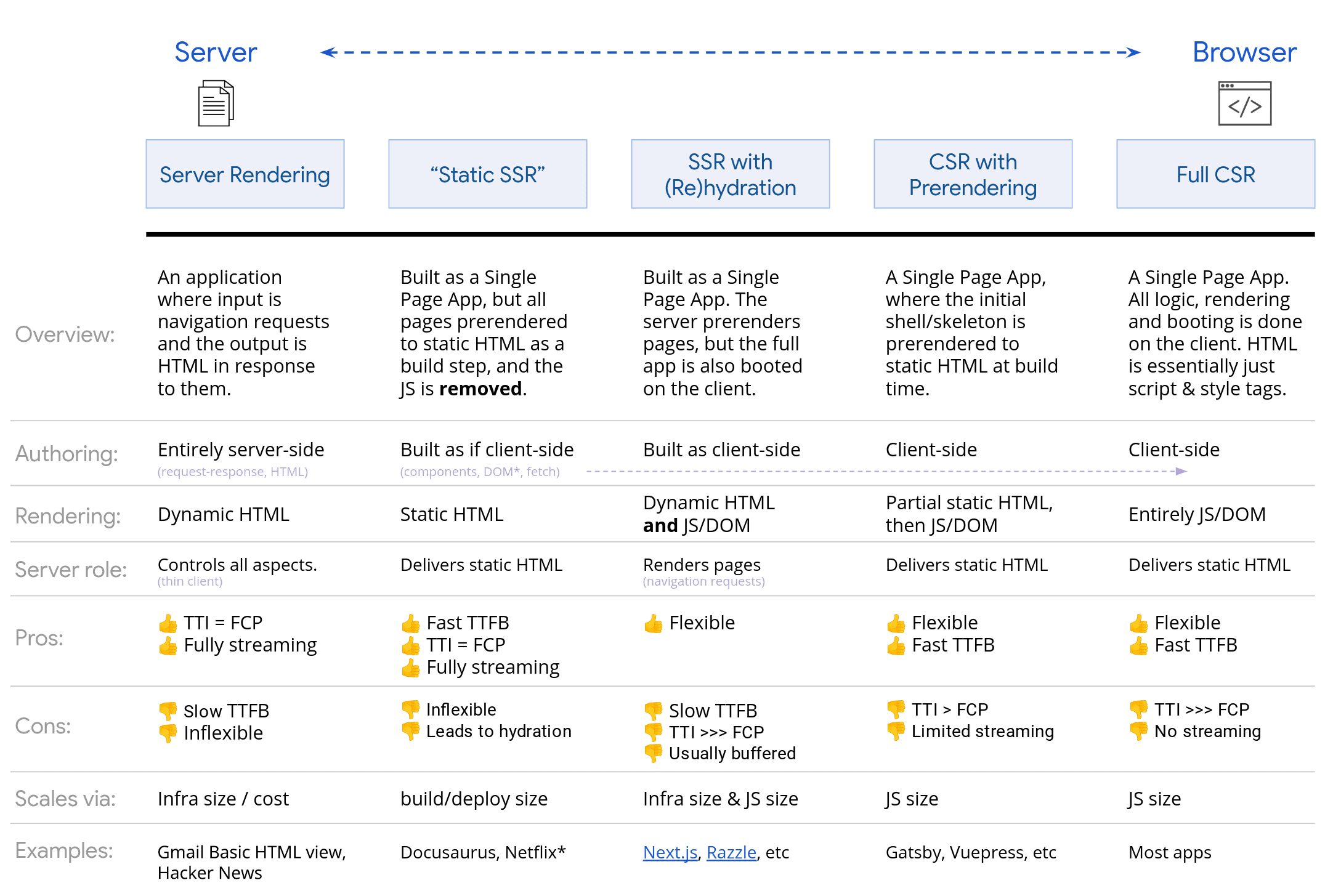
Image source: web.dev, Rendering on the Web
Under each column are pros and cons written as symbols like Slow TTFB, TTI = FCP and TTI >>> FCP. The symbols only say which of TTFB, FCP and TTI comes earlier. They don't say what the server, the network and the browser are doing in between.
Three common metrics
- TTFB (Time to First Byte): from clicking a link until the first byte of the new page arrives.
- FCP (First Contentful Paint): the first time content appears on screen.
- TTI (Time to Interactive): when the page can respond to input.
On a product list page, TTFB is when the server starts answering, FCP is when the first product card shows up, and TTI is when pressing "Add to cart" actually adds something.
That said, the article itself now measures interactivity with INP (Interaction to Next Paint). TTI survives only in figure captions and this table.
Each section below has an animation that loads the same product page the way that section describes. The black bar at the top of the browser says what is happening right now, and you can drag the timeline to any point. Press "Add" on a product card at any moment to see whether the button responds. Durations are schematic; they only keep the table's order of events.
Server Rendering: the server prepares every request
On every request the server fetches the data, renders the whole page, and only then sends the HTML.
request → server fetches data → renders HTML → sends it → browser paints
The first byte can't leave until the server has done all of that, so TTFB is slow.
In return, the HTML the browser gets is complete. Links and forms work without JS, so the page is usable the moment it appears, which is why TTI = FCP.
The table's examples are Hacker News and the Basic HTML version of Gmail.
Static SSR: ready at build time
The HTML is made at build time, and the page the browser gets has no JS files.
At build time the component code runs once in full, and what it renders is saved as HTML, one file per URL.
The browser only receives that rendered result; the JS files are not sent along. That is what the table means by "the JS is removed".
So when a request comes in, the server just sends the file, and TTFB is fast. And since the browser has no JS to wait for, TTI still equals FCP.
Compared with Server Rendering, the browser gets the same complete HTML, and the page appears and works just as fast. The difference is that Server Rendering makes the HTML per request, while Static SSR makes it at build time. Three rows of the table follow from this:
- Authoring: Server Rendering is written as server code that takes a request and returns HTML. Static SSR is written like an SPA, with components, the DOM and fetch, and is simply run once at build time with the result saved as HTML.
- Server role: the Server Rendering server renders every time. The Static SSR server only serves static files.
- Scales via: Server Rendering needs more servers as traffic grows, hence infra size/cost. Static SSR's cost follows the number of pages, hence build/deploy size.
The table lists two cons under Static SSR:
- Inflexible: because the content is fixed at build time, every user gets the same page.
- Leads to hydration: once the page needs interactivity, the JS has to come back, and then it becomes SSR with (Re)hydration.
To tell static rendering from prerendering, the article offers a test:
If you're unsure whether a given solution is static rendering or prerendering, try disabling JavaScript and load the page you want to test. For statically rendered pages, most interactive features still exist without JavaScript. Prerendered pages might still have some basic features like links with JavaScript disabled, but most of the page is inert.
In short: turn off JavaScript in the browser and reload. If most features still work, it's static rendering. If only links work and everything else does nothing, it's prerendering.
SSR with (Re)hydration: the page is there, the buttons aren't working yet
After the server sends complete HTML, the browser still has to download the JS and run every component again before the buttons respond.
Like Server Rendering, the server renders complete HTML on every request, so TTFB is just as slow. But this page needs interactivity, so the browser also has to download the whole app's JS.
The HTML contains an "Add to cart" button. But the <button> the server rendered is only a tag and some text; the function a click should run lives in the app's JS file, which hasn't been downloaded yet.
On top of that, which product the button belongs to and how many items the cart holds aren't in the HTML either. So how does the data reach the browser? The article says:
For the client-side JavaScript to accurately take over where the server left off, without re-requesting all the data the server rendered its HTML with, most server-side rendering solutions serialize the response from a UI's data dependencies as script tags in the document.
In other words, the data the server used to render is put into a script tag in the HTML, so the JS in the browser reads it from there instead of sending another request.
Once the JS has downloaded, the framework runs every component's code again in the browser. Only then does it know "this button belongs to Teapot and calls add-to-cart", and it attaches the click handler to the button already on screen. This is hydration: the DOM isn't rebuilt, but the component code still runs from the top. The same component code runs once on the server and again in the browser, which is why the section of the article is titled "one app for the price of two".
Until hydration finishes, the page looks ready but the buttons don't respond. The article calls this the most important problem:
The most important reason is its effect on the user experience, when a page looks ready but none of its interactive features work.
This stretch is what TTI >>> FCP refers to. FCP arrives early, but TTI has to wait for the JS to download and hydration to finish. In the animation above, press "Add" anywhere between FCP and TTI and the button does nothing.
Some frameworks, though, record clicks made before hydration and replay them once the handler is attached, such as Angular's event replay. Then the click isn't lost; it just takes effect a little later.
The table also lists Usually buffered under SSR with (Re)hydration. The article doesn't explain the term; it probably means the server usually renders the whole page before sending any of it, rather than sending while it renders.
CSR with Prerendering: the shell first (usually a skeleton), and the browser fetches the data
Only the shell is made at build time; the product data waits for JS in the browser to fetch it.
The table describes it as "the initial shell/skeleton is prerendered to static HTML at build time": only the frame is generated at build time, such as the nav bar and grey skeleton cards.
When a request comes in, the server just sends the file, so TTFB is fast. The shell paints quickly too, so FCP is early.
After that, the browser downloads the JS, starts the app, fetches the data itself, and only draws the product cards once the data arrives.
If every child component fetches its own data, it gets slower still. A child only starts fetching after its parent has rendered, so each level of nesting adds another round trip.
The table gives CSR with Prerendering the con TTI > FCP, two fewer > than Full CSR. Yet both do the same work after FCP, and prerendering only moves FCP earlier, so by rights its gap should be larger than Full CSR's. The article doesn't say why it gets fewer >.
Maybe the symbols measure how it feels to the user: a skeleton plainly says "still loading", so nobody rushes to click. But by the same logic Full CSR, a blank page with nothing to click by mistake, should also get one >, and the table says >>>. So this reading probably explains only the CSR with Prerendering column.
Full CSR: the HTML holds only script and style tags
The HTML holds only script and style tags, so everything on screen waits for JS to draw it.
The table describes it as "HTML is essentially just script & style tags". Because the HTML the browser receives is nearly empty, the first paint has to wait for the JS to download and run, and then the data still has to be fetched and the list rendered.
The server only sends a file, so TTFB is fast. But FCP waits for JS to draw the shell, and TTI waits further for the data and the list, which is why the table says TTI >>> FCP.
The other con under Full CSR, No streaming, has the same cause. Because the HTML has no content, there is nothing to paint while it arrives.
Which one to pick
The table's Flexible and Inflexible mark when the content is decided:
- The same for everyone and rarely changing: docs sites or blogs. Making them at build time is usually simplest, since Static SSR has a fast TTFB and ships no JS. The table's example is Docusaurus.
- Different on every request: search results or a personalized home page. Since nobody knows at build time who the user is or what they'll search for, the server has to render each time, or the browser has to fetch the data.
- Heavily interactive: editors or dashboards. These pages ship the whole app's JS anyway, so the remaining question is whether the server draws the first screen, that is, hydration or CSR.
One site often mixes them. The marketing pages are generated at build time, while the dashboard behind the login uses CSR. Frameworks like Next.js let each route pick its own.
Other techniques from the second half of the article
The two quotes below both come from the second half of the article.
Streaming SSR
Streaming server-side rendering lets you send HTML in chunks that the browser can progressively render as it's received. This can get markup to your users faster, speeding up your FCP.
In short, the server sends the HTML in several chunks and the browser paints each one as it arrives, so FCP comes earlier.
Progressive rehydration
With this approach, individual pieces of a server-rendered application are "booted up" over time, instead of the current common approach of initializing the entire application at once. This can help reduce the amount of JavaScript needed to make pages interactive, because it lets you defer client-side upgrading of low-priority parts of the page to prevent it from blocking the main thread, letting user interactions happen sooner after the user initiates them.
The main thread does one thing at a time. Say hydrating the whole app in one go takes 700ms. If the user presses "Add to cart" during that time, the browser has to finish all 700ms before it handles the click.
Progressive rehydration splits hydration into small pieces and pushes low-priority parts back. On a product page, the "Add to cart" button at the top can hydrate first and the review section at the bottom later. Then a click doesn't wait the full 700ms, only for the piece currently running to finish. The article doesn't say who decides the priorities, or how.